Job scams exposed: How to spot them, stay safe, and report fraud


A message arrives about a high-paying remote job. The role looks legitimate, the recruiter seems professional, and the hiring process moves quickly. It feels like a great opportunity, until something doesn’t quite add up.
Job scams are increasingly common, and many are designed to look like real offers from trusted companies, but they try to steal your personal data.
What are job scams?
Job scams are fake job offers designed to make people think they’re applying for or accepting real work. They often look convincing, with polished listings, familiar company names, and what appears to be a normal hiring process. However, the goal is usually to steal money, personal information, or account access.
How job scams work
Most job scams follow a similar pattern. Usually, scammers try to achieve a specific outcome:
- Credential harvesting: Stealing personal details or account logins, often through fake forms or login pages.
- Payment scams: Asking for upfront fees, equipment purchases, training costs, or fake-check transfers.
- Money mule recruitment: Getting victims to receive, move, or transfer funds, sometimes without realizing the money is connected to fraud.
- Malware delivery: Sending files or links that install harmful software through downloads or attachments.
Scammers often reach people through the same trusted channels used for job searches. For including emails, job boards, professional platforms, social media, texts, and messaging apps. According to Statista, email was the most commonly reported contact method for job scams, accounting for around 31% of cases, followed by social media at just over 20%.
Messages are often designed to appear trustworthy by using company names, recruiter details, or familiar hiring language. Scammers can also post fake listings directly on legitimate job boards, sometimes removing and reposting them quickly to avoid being noticed.
To reach more people, scammers may send mass messages or reuse templates. AI tools can also make scam messages easier to scale and more convincing, including fake job listings, recruiter outreach, and phishing messages.
Why are job seekers targeted?
Job searches often involve sharing personal information, and later hiring steps may involve financial details. Scammers exploit that normal process to collect information that can be used for fraud. Applying for roles, responding to recruiters, and moving through hiring processes can all involve details that, in the wrong context, may support identity theft, account takeover, or financial fraud.
Job searches can add pressure to act quickly, especially when money or time is a concern. Remote roles can also make it harder to verify the person or company behind an offer, since there may be no face-to-face interaction. Because fake listings can appear on job boards, college employment sites, social media, and other familiar channels, they can look like part of a normal job search.
Common types of job scams
Not all job scams look the same, but many follow familiar patterns designed to seem convincing.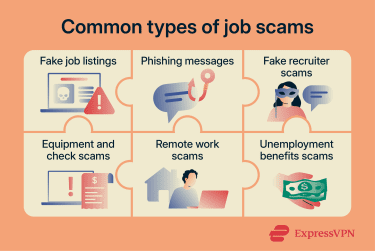
Fake job listings
Scammers often use fake job listings to target people at the start of a job search. For instance, they may copy real job descriptions from legitimate companies or create listings that appear to be genuine roles, sometimes even using the name of a well-known employer.
Often, the role may not exist at all, or it may be loosely based on a real position but with altered details, such as a higher salary, spoofed company website, or different contact details. Once someone applies, the listing becomes a way to start direct contact outside the original hiring process.
Phishing messages
Phishing messages are a common way scammers reach people directly, often posing as recruiters or employers. Instead of waiting for someone to apply, they may send a job opportunity directly or claim to be following up on an application.
These messages can appear via email, SMS, or messaging apps like WhatsApp or Telegram. Scammers may use messaging apps because they allow fast, direct contact and move the conversation away from job platforms where suspicious activity may be easier to report. They're often written to sound direct and conversational, which can make them feel like real recruiter outreach.
These messages usually introduce a role or next step in the hiring process, then prompt the recipient to click a link, download a file, or share information. This can include requests to complete forms or verify your ID through a fake portal, allowing a scammer to capture the information.
Fake recruiter scams
Fake recruiter scams rely on impersonation. Scammers impersonate recruiters or hiring managers, sometimes copying details from genuine recruiter profiles or using fake profiles to appear credible.
They might contact someone on LinkedIn, claiming to have found their profile and identified them as a good fit for a role. The conversation can continue over messages, with interview questions, job details, and next steps that feel like a normal hiring process.
The process may even include documents or a job offer that looks official. Ultimately, the goal is to make the experience feel real from start to finish, making requests for money, personal information, or account access seem more believable.
Equipment and check scams
Equipment and check scams are designed to get job seekers to send or handle money as part of a fake job. The role may involve setting up a home office, purchasing tools, paying for training or screening, or assisting with payment processing.
After someone accepts the offer, they might be told to purchase equipment through a specific supplier or using money the “employer” provides. They may also receive a check or electronic payment and be asked to buy equipment, send money to a vendor, or forward part of the payment to another recipient.
The process may seem like a normal step in getting started, but it can lead to financial loss if the original payment is fraudulent, bounces, or is later reversed by the bank.
Remote job scams
Remote job scams exploit the flexibility of work-from-home roles. They’re often advertised as simple tasks, like data entry, product ratings, app optimization, or admin work, with vague requirements and quick earnings claims.
The entire process may happen online without ever speaking to anyone directly. Instructions, tasks, and next steps can be handled via email or messaging apps, which can make the process feel more organized while bypassing standard verification steps.
Because everything happens remotely, there’s less opportunity to verify the company or the people behind it, which can make these scams easier to carry out and even harder to question.
Unemployment and benefits-related scams
These scams are not always fake job offers, but they often target people who are out of work or receiving financial support. Scammers take advantage of this situation by posing as government agencies, job placement services, or organizations offering help with benefits.
These scams may involve messages about eligibility checks, missed payments, account reactivation, or new job opportunities linked to benefits. The message may look official, with references to programs, forms, or application steps, but lead to a fake website or form.
As the conversation continues, the message may ask for personal details, login credentials, or financial information. The goal is usually to collect sensitive information that can be used for identity theft, unemployment benefits fraud, or other fraud.
How to tell if a job offer is a scam
Even convincing job offers tend to follow familiar patterns that could indicate they’re a scam. The key is knowing where those patterns usually appear.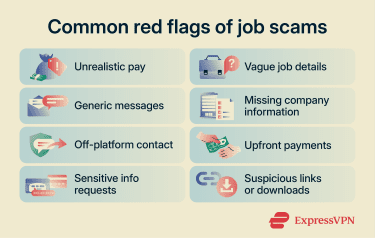
Warning signs in job descriptions
You can often spot job scams by looking closely at the listing. It may look professional at first, but the details don’t always make sense.
Scam listings are often designed to attract a wide range of applicants, which is why they may promise high pay for little effort or experience. At the same time, they tend to stay vague about what the job actually involves.
Common warning signs include:
- High pay for little or no experience.
- Vague or unclear job responsibilities.
- Missing or hard-to-verify company information.
- Instructions for applying via external links, personal email, messaging apps, or other off-platform channels.
For example, a job description might advertise “Remote Data Entry Clerk: Earn $35/hour." It might promote benefits such as “no experience required,” work-from-home options, or flexible hours. Then it may ask applicants to send details by email or contact the recruiter on another platform.
Red flags in emails and texts
Scam messages often mimic recruiter outreach or application follow-ups, making it seem like the recipient has already applied for a job and is being considered for a role.
Common red flags include:
- Unexpected job offers without any prior application.
- Generic, awkward, or impersonal wording.
- Sender details that don’t match the company.
- Urgent requests to click, reply, or act quickly.
- Early requests to continue via WhatsApp, Telegram, or another messaging app.
For example, you might receive an email that starts with “Dear applicant” and asks you to click a link to continue your application. You might get a WhatsApp message saying: “Hello, we’re hiring for remote work. Earn a daily income reviewing products. Message us to get started.” It sounds too good to be true, and that’s the idea.
Also read: 10 phishing red flags in emails and what to do about them.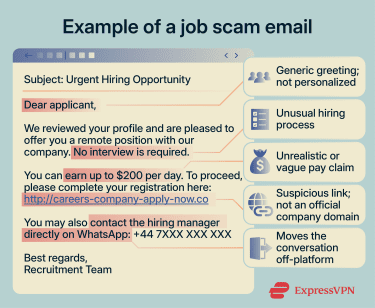
Signs a recruiter may be fake
Scammers often impersonate recruiters to build trust, making the job offer seem more legitimate.
Some common patterns include:
- Profiles with little activity, limited work history, or details that are hard to verify.
- A mismatch between the recruiter’s name, company, and email address.
- Conversations that quickly move off platforms like LinkedIn to email or messaging apps.
- Interview processes that feel rushed, informal, or incomplete.
For example, a fake recruiter might contact someone on LinkedIn about a role, then ask to continue the conversation on WhatsApp or another messaging app rather than keeping it on LinkedIn. They might also rush the interview process to make the “hire” feel urgent. These tactics can make later requests for money, personal information, or account details seem more credible.
Requests that should raise concerns
The clearest signs of a scam often appear when applicants are asked to take action. This is usually the point where the situation shifts from a job opportunity to something else.
For example, applicants may be asked to pay for equipment before starting or share bank details for “payroll” before receiving a formal offer. They may also be asked to verify an ID through an unverified link before any formal interview.
Common warning signs include:
- Requests for upfront payments, such as equipment, training, or onboarding fees.
- Requests for sensitive personal information early in the process.
- Instructions to receive or transfer money as part of the role.
- Requests to download files, open attachments, or install unfamiliar software.
Legitimate employers don’t ask applicants to send money, move funds, or share sensitive financial or identity details before they've been properly hired. If a role includes these kinds of requests, it’s probably not genuine.
How to protect yourself from job scams
You can’t avoid every scam, but you can reduce your risk by checking key details and protecting your information throughout the process.
Research the company and recruiter
Before responding to a job offer, it’s worth taking a moment to check who you’re dealing with. Here are a few practical steps you can take:
- Look up the company’s official website and confirm its contact details.
- Check that the recruiter is using a legitimate company email domain.
- Search for the role or recruiter across multiple sources to see if their role and employer match.
- Check when the website or domain was created (for example, via a Whois), but treat domain age as one signal rather than proof on its own.
Protect your personal information
If a scammer steals personal details through a fake job offer, that person may be at risk of identity theft, account takeover, and internet fraud. The scammer might also reuse the information in different ways, often long after the first contact.
For example, stolen details could be used to try to open bank accounts, apply for loans, or take over existing accounts. Scammers may also try to reset passwords or use SIM swap attacks, where they take control of a user's phone number to intercept calls or text-based verification codes. Stolen information may also support payroll fraud, such as redirecting wages, or employment identity theft, where someone uses another person’s information to get a job.
To reduce your risk:
- Only share personal details through official, verified hiring channels.
- Avoid uploading sensitive documents or completing ID checks via links from unknown contacts.
- Use a password manager to create strong, unique passwords for each account.
- Enable two-factor authentication (2FA) on your email and financial accounts before starting your job search; use an authentication app or security key where available.
Verify job offers before responding
Before sharing personal information or taking the next step, confirm that the role itself is real. Scammers often rely on offers that look familiar or trustworthy, so it’s worth checking the details independently.
Here are a few steps you can take:
- Cross-check the job listing on the company’s official careers page.
- Make sure the job title, location, salary, and requirements match across sources.
- Contact the company using verified contact details, not the contact information in the message.
- Be cautious if the offer skips normal hiring steps, such as interviews or formal paperwork.
Legitimate employers won’t object to some basic verification. Taking these steps can help you avoid unnecessary risk.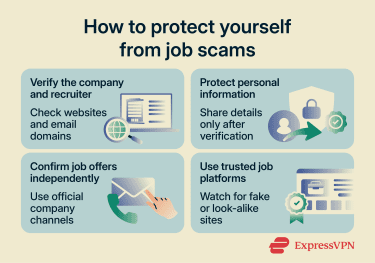
Use trusted job search platforms
Some job platforms actively review listings and allow users to report suspicious posts, helping reduce the risk of scams. For example, listings may be removed if they’re flagged by users or don’t meet platform guidelines.
Unfortunately, scammers can still copy these platforms or create look-alike websites that seem real. A link may appear to lead to a listing on a well-known platform, but instead takes the visitor to a look-alike site with a slightly different web address, such as “indeed-jobs-careers.com” rather than the official Indeed site. It may also use the same logo and layout, making it difficult to spot as fake.
Using well-known job boards and official company career pages can help, but it’s also important to pay attention to how the process unfolds.
Here are a few best practices:
- Apply through trusted job boards or the company’s official careers page.
- Be cautious if you’re asked to move off the platform early in the process.
- Check the website address for small spelling mistakes or unusual links.
- Avoid downloading files, Android application package files (APKs), or unfamiliar apps from unverified links during the hiring process.
What to do if you encounter a job scam
Realizing a job offer isn’t genuine can be frustrating, but taking action early can help protect your information and finances.
Stop contact with the scammer
If you suspect a job scam, it’s important to stop engaging straight away. Continuing the conversation can increase your risk, especially if the scammer tries to follow up or contact you from another account.
Save copies of the messages first, then stop replying to messages or emails. Avoid clicking any links or downloading any files they’ve sent, and block or report the account on the platform you’re using.
Secure your personal and financial accounts
If you’ve shared any personal or financial information, your accounts may be at risk, so it’s important to act quickly.
Start by changing the passwords on your email, banking, and other important accounts, especially if you’ve reused the same password elsewhere. You should also enable 2FA, which adds an extra layer of security and makes it harder for someone else to access your accounts.
Next, check your bank and payment accounts for any unusual activity, such as transactions you don’t recognize or changes you didn’t make. If you see anything suspicious, report it to your bank. If money was sent, contact the bank, payment app, card issuer, wire service, or cryptocurrency platform used for the transaction and ask whether it can be reversed.
It’s also worth monitoring your accounts over time, as misuse doesn’t always happen straight away. Identity protection tools can help monitor for signs of identity misuse. For example, ExpressVPN Identity Defender, currently available to eligible U.S. users on Advanced and Express Pro plans, includes ID Alerts, Credit Scanner, Data Removal, and identity theft insurance, with features varying by plan.
Save evidence of the scam
Having a record of what happened can make it easier to report the scam and support any investigation. It also gives you something to refer back to if you need to follow up later.
Save everything in a secure place, including emails, messages, and screenshots of your conversations. Keep copies of links, files, or attachments the scammer sent, along with records of any documents or information you shared. If money is involved, keep payment details and transaction records.
How to report job scams
Reporting a job scam helps authorities track patterns and take action, which can help stop others from falling victim to the same scam.
Where to report online job scams
If you’re in the U.K., you can report job scams through Report Fraud. In the U.S., you can report scams to the Federal Trade Commission (FTC) at ReportFraud.ftc.gov. If the scam involved online fraud, account compromise, money transfers, or cryptocurrency, you can also report it to the FBI’s Internet Crime Complaint Center (IC3). If you’re in the EU, report cybercrime through your country’s national reporting website, cybercrime unit, or local police. Europol provides links to national reporting channels.
You should also report the scam on the platform where you found it. Most job boards and social platforms have built-in tools to report suspicious listings, messages, or accounts, which can help get them removed more quickly.
How to report scam texts and emails
Start by reporting phishing emails through your email provider, for example, by marking them as phishing or spam. In the U.S., phishing emails can also be forwarded to the Anti-Phishing Working Group at reportphishing@apwg.org, and phishing attempts can be reported to the FTC. In the U.K., suspicious emails can be forwarded to report@phishing.gov.uk.
If you receive a scam text, you may be able to forward it to your mobile provider’s reporting number, such as 7726 in the U.S. and U.K., depending on your region. For messages on apps like WhatsApp or Telegram, use the in-app reporting tools to flag the account or conversation.
When reporting, include the evidence already saved, such as screenshots, sender details, message content, links, attachments, and transaction records where relevant.
Also read: What is smishing? Spot and prevent SMS phishing scams.
FAQ
How can I verify if a recruiter is legitimate?
Can a real employer ever ask for money upfront?
What personal information should I never share with an employer?
How quickly should I report a job scam?
Can job scams appear on trusted job boards?