Is Lensa safe? A cybersecurity and privacy analysis of the AI photo app


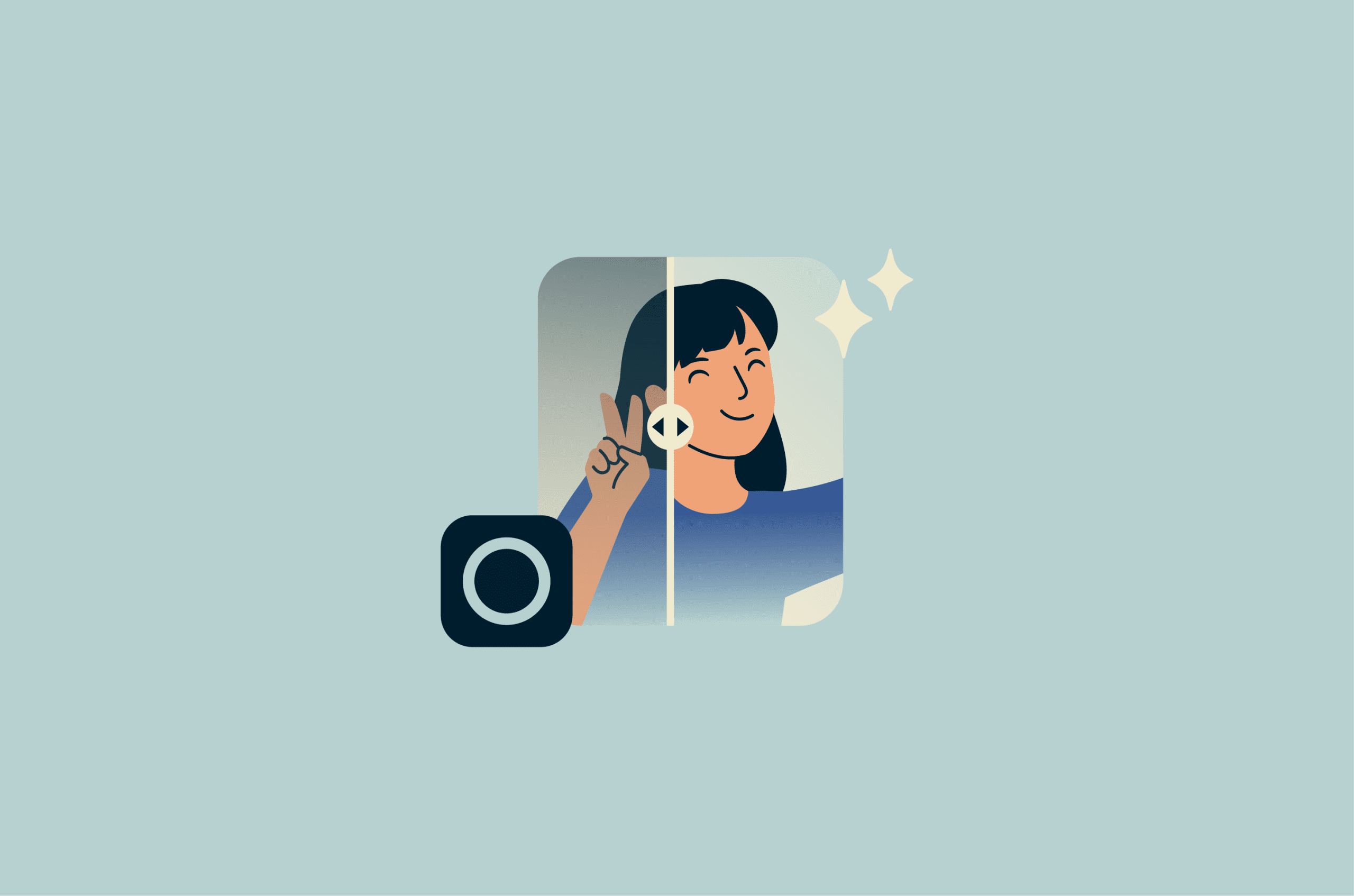
AI photo-editing apps offer a quick and effortless way to transform images and have become extremely popular for this reason. However, it's important to know that these apps often collect highly sensitive data. Lensa AI's Magic Avatars feature, for example, requires users to upload around 5 photos of their face, which the app then uses to generate personalized avatars.
Before you hit submit, it's worth understanding where this data is processed, how long it's stored, who may have access to it, and how the app handles security and privacy overall.
Please note: This information is for general educational purposes only and does not constitute legal advice.
What is Lensa AI?
Lensa is a mobile photo-editing app developed by U.S.-based Prisma Labs. The app was released in 2018 and now combines standard photo-editing tools with AI systems that process and transform images based on uploaded photos and user input.
Its most prominent feature is Magic Avatars, introduced in 2022. This tool creates stylized portraits by generating new images from user photos.
Beyond avatars, Lensa includes a range of AI-driven editing features, such as background manipulation, facial retouching, and automated image enhancement. It also offers standard controls like exposure, contrast, and color adjustments, similar to other photo-editing apps.
However, unlike basic filter-based apps that apply visual overlays, Lensa uses AI to transform images rather than simply applying effects. This means the app creates new images based on user photos rather than just modifying them.
How does Lensa work?
To use Lensa's Magic Avatars, you upload several photos of your face, which the app processes on external servers to create AI-generated portraits in a range of visual styles. Using multiple images helps the system capture different angles, expressions, and lighting conditions, improving the accuracy of the final avatars.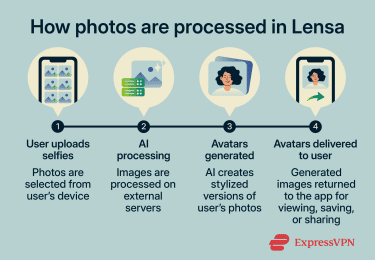
Instead of applying a simple filter, Lensa uses Stable Diffusion, a powerful open-source generative AI model that can generate entirely new images based on patterns learned from large datasets. The model uses visual features from your photos, such as facial structure and positioning, to create new images guided by predefined visual styles, such as fantasy, sci-fi, or artistic portraits.
Is Lensa safe to use?
Lensa's privacy policy explains how it collects, processes, and stores user data, including photos and device-related information. Let's take a closer look at what that means for your data.
What data does Lensa collect?
Lensa collects the photos and videos you upload, along with other data such as:
- Your IP address.
- Device identifiers.
- Advertising IDs (Identifier for Advertisers (IDFA) on iOS or Android Advertising ID), though you can disable this.
- Information about how you interact with the app.
According to its policy, Lensa uses this data to run the app, improve its performance, and show you more personalized content and ads. It also says it may share user data with third parties like Meta and Google to build advertising audiences based on user characteristics.
In other words, your activity inside the app can contribute to how you're profiled for advertising outside of it.
Third-party infrastructure
Lensa uses different infrastructure depending on the feature. Magic Avatars are processed on Amazon Web Services (AWS) servers, while some other AI features may involve third-party providers such as Google/Gemini, Fal.ai, or OpenAI.
For Magic Avatars, Lensa says the original photos and related image data are deleted after successful generation. For features involving external AI providers, Lensa says those providers may temporarily retain photos according to their own policies.
Your right to delete your data
Lensa allows you to request full account deletion and says it will generally process these requests within 4 hours. That sounds simple, but there are a few things to keep in mind.
First, the company may retain your data for longer if needed to comply with legal obligations, resolve disputes, or enforce its agreements. This type of clause is common in privacy policies.
Second, even after deletion, Lensa may keep anonymized data. This refers to information that can no longer be linked back to you personally, and the policy doesn't go into detail about how long this type of data may be kept.
One more thing to know: deleting the app doesn't delete your account or your data. To remove your information, you need to submit a deletion request through the app settings or by contacting the company at privacy@lensa.app.
Photo deletion timeline
Lensa stores uploaded photos for no longer than 24 hours before they're deleted from its servers. This is one of the app's clearest data protection claims.
During those 24 hours, your photos are still held on remote infrastructure. In that window, they could be accessed in the event of a security incident, disclosed in response to a legal request, or handled by internal systems during processing.
Note that Lensa also states that no method of transmission or storage is completely secure, and there's no publicly available third-party audit confirming how the deletion process is implemented.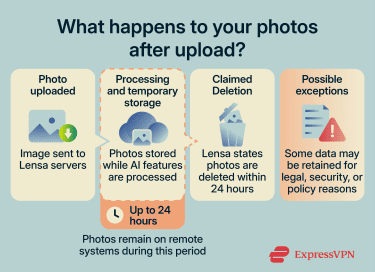
App permissions
Lensa needs access to your camera and photo library to generate avatars. Depending on how you use the app, it may request additional permissions, such as tracking or notifications, which you can decline without affecting core functionality.
Either way, you can review and adjust permissions on both iOS and Android in your device settings.
The licensing clause: What changed and what didn't
Lensa's licensing terms drew criticism in late 2022 after users noticed language granting Prisma Labs a "perpetual" and "irrevocable" license to use uploaded content. Lensa's December 2022 terms did include a perpetual, irrevocable, worldwide, transferable, and sub-licensable license to use, reproduce, modify, distribute, and create derivative works from user content.
The company later clarified that photos uploaded for Magic Avatars were used to personalize a temporary copy of the Stable Diffusion model for that user, not to train a general model shared across users. Lensa's current privacy policy says the uploaded photos, the temporary copy of the model, and associated image data are deleted after the avatars are generated and that personal data is not used to train or create separate AI products.
Lensa's current Terms of Use no longer use the same "perpetual" and "irrevocable" wording for its general User Content license. However, the license remains broad: users grant Lensa a worldwide, transferable, and sublicensable license to use, temporarily cache, reproduce, modify, distribute, and create derivative works from User Content, but only for the stated purpose of operating or improving Lensa. The terms also say this license ends when the user deletes the content from Lensa's library or terminates their account.
For Magic Avatars specifically, Lensa says the original uploaded photos and related image data are deleted after successful generation. The generated avatars themselves are stored in the user's Lensa account until the user deletes them or deletes the account; as mentioned, Lensa says it generally processes those deletions within 4 hours.
What security measures does Lensa have in place?
Lensa says it uses "industry-standard legal and organizational security measures" to protect user data during transmission and processing. However, there isn't much detailed description in the policy of what these measures involve.
For example, the policy doesn't state which encryption methods are used or whether the company holds certifications like Service Organization Control 2 (SOC 2) or International Organization for Standardization 27001 (ISO 27001), and it doesn't specify a timeline for breach notification. It also refers to safeguards such as access controls and the use of cloud providers like AWS and Google Cloud, but it doesn't explain how these are implemented in practice (for example, who can access data internally or how it's handled during processing).
Instead, the app describes its security in general terms, and there's limited public independent verification of how these protections are implemented beyond what the company discloses.
Known risks of using Lensa
Some of the trade-offs of using Lensa only become clear once you look at how your data is handled and how the app's outputs are generated. Here are some key considerations.
Data breaches could expose uploaded photos
Your photos are at the center of how Lensa works, and that obviously includes facial data. This type of data is sensitive because, unlike a password, you can't change it if it's exposed.
Lensa temporarily stores photos while they're being processed. While it has security measures in place, your photos are handled on remote systems during processing. This can include detailed facial images that you may not have shared publicly.
What's more, if there were to be a data breach, it might not just involve photos. It could also include information like your device details, IP address, and how you use the app. When combined with facial data, this could make it easier to identify a user.
Racial and gender bias in generated images
Lensa's Magic Avatars has, in some cases, created sexualized images from ordinary selfies, even when users didn't mean to generate that kind of content.
In one test covered in the MIT Technology Review, a journalist found that 16 out of 100 avatars generated from her photos were topless, while 14 showed highly sexualized poses.
Some users and journalists also said the app changed or softened racial features in ways that reflected Western beauty standards. Other coverage described cases where users felt their AI avatars looked generically Asian rather than like them as individuals.
This is consistent with broader warnings around Stable Diffusion: its model card notes that image-generation systems can reinforce or worsen social biases and that Western and white cultures may be overrepresented in outputs.
Scams and misuse associated with Lensa
Lensa is designed as a photo-editing app, but the way it generates images also opens the door to certain types of misuse. These risks don't come from the app itself but from how malicious actors might use it.
When doctored images are used as input into Lensa, the app can generate explicit content. Since the generated images are based on uploaded photos, they can depict real people in ways they never consented to.
After generation, these images can exist as files outside the app. This means they can be:
- Saved to a device.
- Shared on other platforms.
- Reused without the person's knowledge.
Reports have also raised concerns that AI avatar tools such as Lensa can generate inappropriate or sexualized outputs from images of children or young-looking subjects. This is one reason Lensa's terms prohibit using the app to exploit or harm minors, generate sexually explicit content, or use outputs for unlawful deepfakes.
How to use Lensa more safely
If you decide to use Lensa, there are some practical steps you can take to limit how much data you share. These won't eliminate all the risks, but they can help you stay more in control.
- Limit app permissions: You need camera and photo library access to use the app, but you can disable permissions like microphone, location, contacts, and social media in your device settings.
- Adjust advertising settings: Lensa allows you to opt out of certain types of data sharing for advertising. You can do this in the app settings or by contacting the company directly.
- Be selective about what you upload: Avoid sharing any sensitive images.
- Request data deletion when you're done: As mentioned above, deleting the app doesn't remove your data. You'll need to submit a deletion request through the app or by contacting Lensa.
- Keep your app and device updated: Updates can include security fixes, so it's worth keeping both the app and your operating system current.
- Review permissions regularly: App settings change over time, so, as with any app, it's a good idea to regularly check what access Lensa has on your device.
- Report unexpected or inappropriate outputs: If the app generates content that seems wrong, you can report it through the app or by contacting support.
How to delete your Lensa account and app
If you decide you no longer want to use Lensa, it's important to understand the deletion process. Deleting the app from your phone doesn't delete your account or the data Lensa stores. Since deleting your account can be done through the app, it's best to do that first, and then delete the app itself.
Deleting your account
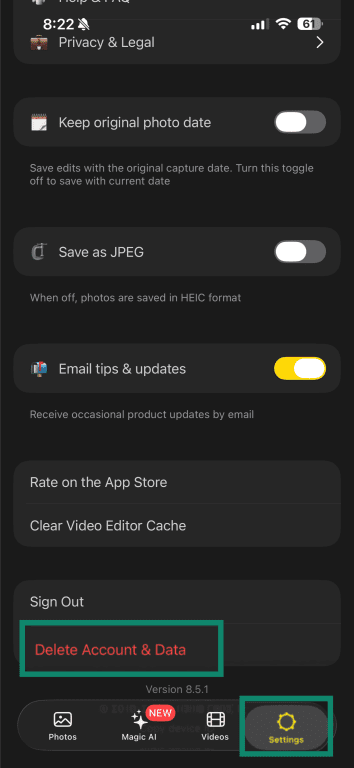
- Open the Lensa app, go to Settings, and tap Delete Account & Data.
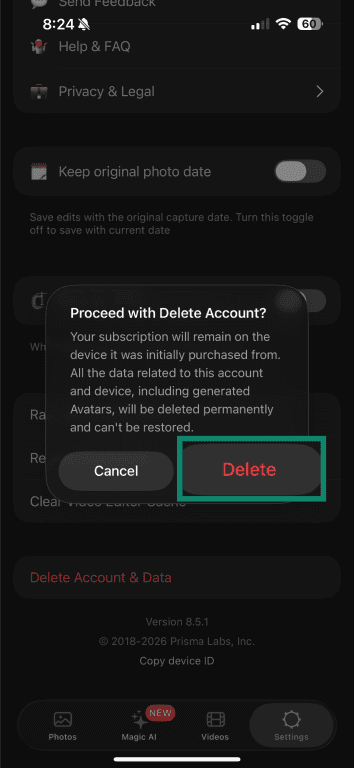
- Tap Delete to proceed with account deletion.
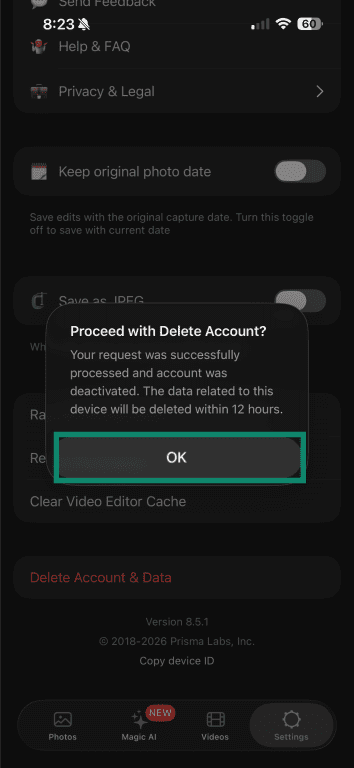
- Tap OK after the confirmation message appears.
Alternatively, you can request account deletion by contacting Lensa at privacy@lensa.app.
Deleting the app
On iOS:
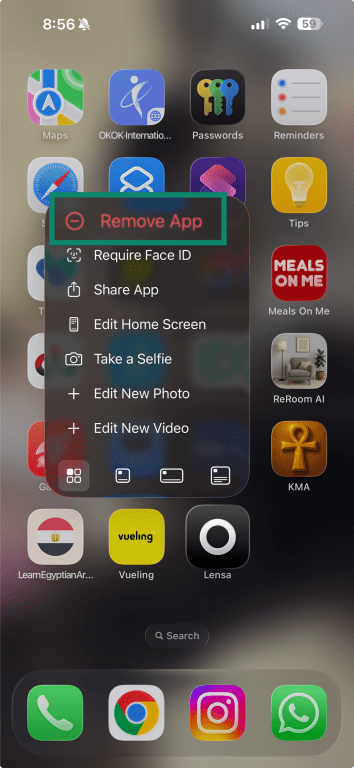
- Press and hold the Lensa app icon on your home screen, then tap Remove App.
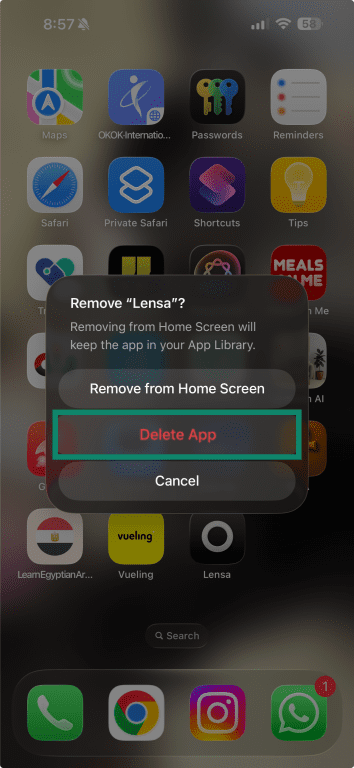
- Tap Delete App.
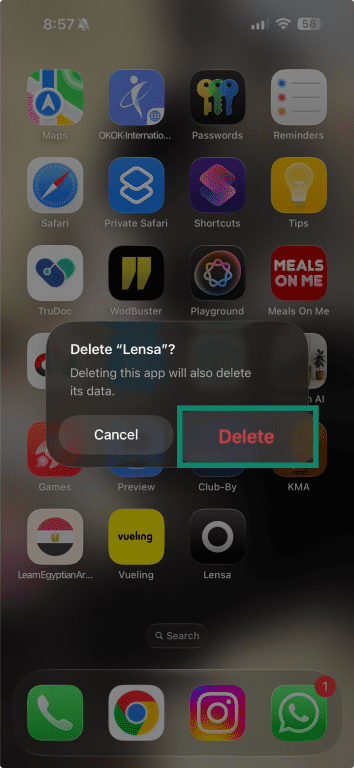
- Confirm by tapping Delete.
On Android:
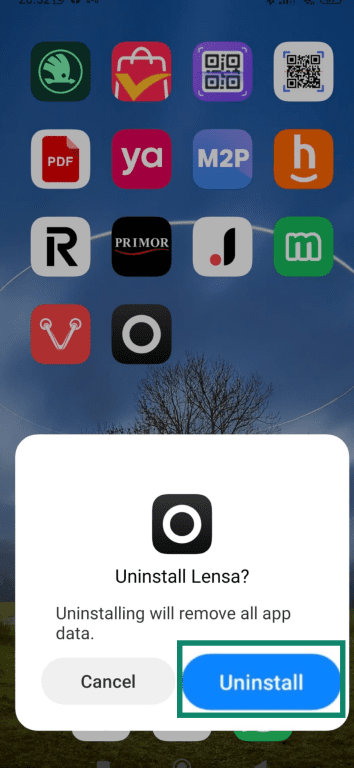
- Press and hold the Lensa app icon, then tap Uninstall.
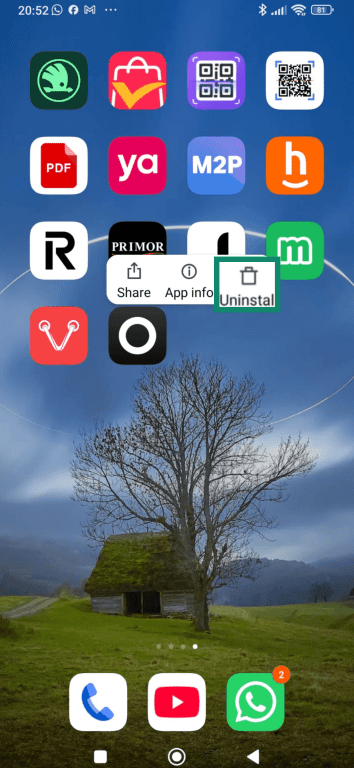
- Confirm by tapping Uninstall.
FAQ
Is Lensa safe for children?
Some reported cases have raised concerns about images that handle sensitive attributes such as age or appearance in a way users deemed offensive or disturbing. Because of how Lensa processes photos and generates results, it's not a good fit for younger users.
Is Lensa AI safe to use?
What are the risks of using Lensa?
Can Lensa use your photos for AI training?
Is Lensa safe compared to other AI apps?